---
title: "My TV was full of ads. Here's how I made it calm again."
url: https://blog.prodhosh.me/blog/my-tv-was-full-of-ads-heres-how-i-made-it-calm-again
date: 2026-11-21T17:05:42.193Z
updated: 2026-11-21T17:15:30.941Z
author: Prodhosh VS
description: "My Android TV was slow and full of ads. Here's how I safely switched off 26 bloat apps, kept a restore script, and built a calm Mount Fuji home screen."
tags: ["android-tv", "open-source", "debloat", "side-project", "android", "home screen", "fuji home", "clock", "tamil calendar", "here's"]
keywords: ["android-tv", "open-source", "debloat", "side-project", "android", "home screen", "fuji home", "clock", "tamil calendar", "here's"]
reading_time: 13 min read
word_count: 2542
language: en-IN
---
# My TV was full of ads. Here's how I made it calm again.
I watch a lot of NBA. Live games, mostly, and I'm a Warriors fan, so tip-off times matter to me.
But I avoided watching on my TV. Not because of the screen, because of what happens before the screen shows anything. The TV was so bloated that it crawled. Every app took ages to open, and by the time a live game finally loaded, I'd already lost my patience.
Then there was the home screen. Press the Home button and you get this:
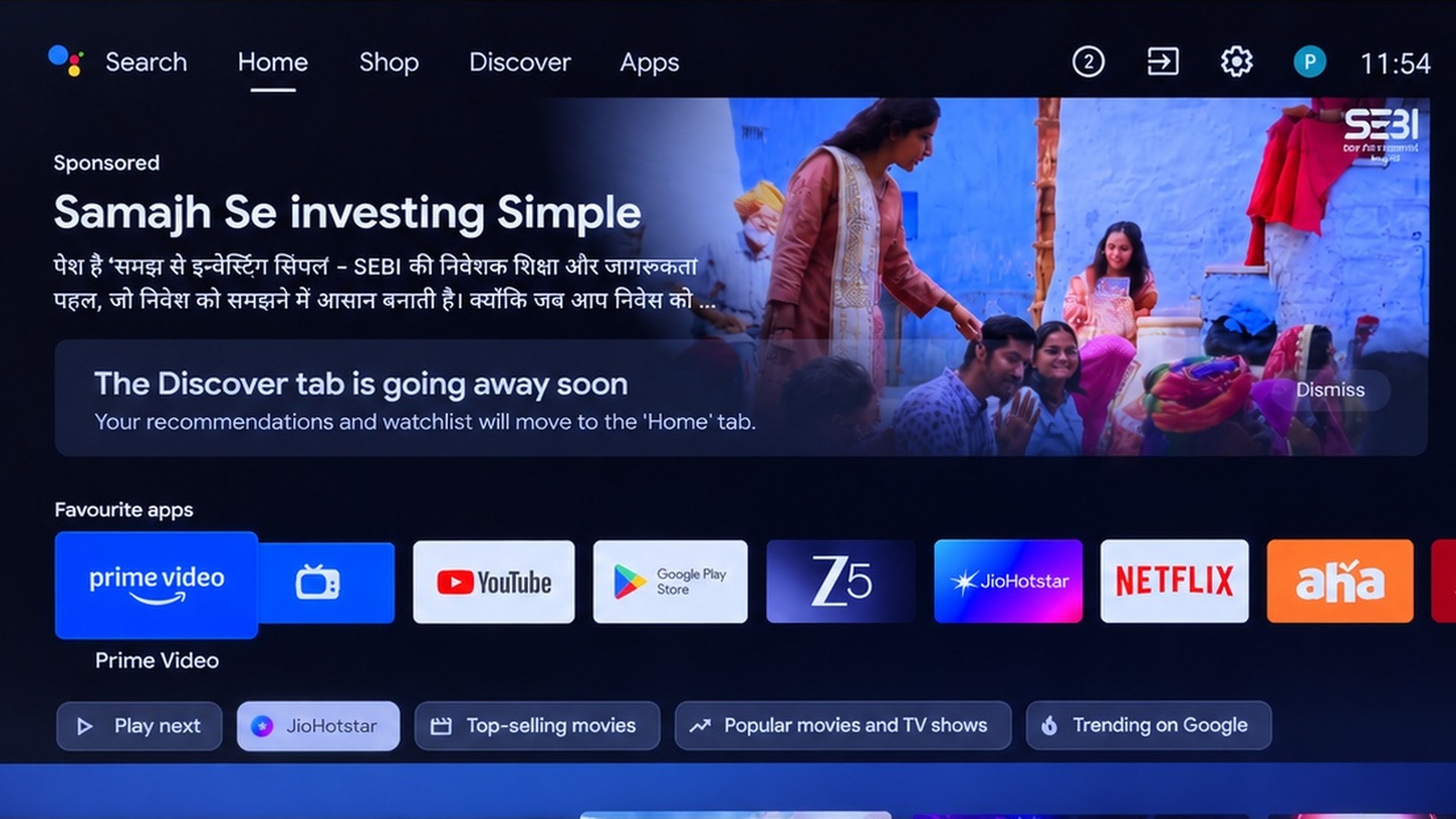
A sponsored banner. A trailer that starts playing on its own. Rows of "recommended for you" tiles with ads mixed in. The app I actually wanted was somewhere three rows down.
I don't think my TV is special here. This is what most Android TVs look like out of the box. So I decided to fix mine, and this post is the whole process: what was wrong, how I cleaned it up, what I was scared of, and the home screen I ended up building.
## Why TVs end up like this
A TV maker doesn't only sell you a screen. The home screen is a billboard, and they get paid for what shows up on it. On top of that, TVs ship with ad apps, trackers and background services that you never asked for and can't easily remove. They run all day, and on a TV with 2 GB of RAM, that adds up.
That's the "slow" part. The "ads" part is right there on the screen.
## Finding CleanYourTV
While looking for a way out, I found an open-source project called [CleanYourTV](https://github.com/Gathin23/cleanyourtv). It's a debloat tool for Android TVs, with about 60k stars on GitHub, and a very active community.
I'll be honest, I was confused at first. It sounded like magic. So I read through the repo until I understood what it was really doing, and here's my understanding of it:
- An Android TV already has a home screen. It's just an app, called a launcher, that the TV opens when you press Home.
- You can install a *second* launcher like any other app.
- Then you switch the original launcher off, so the Home button opens your new one instead.
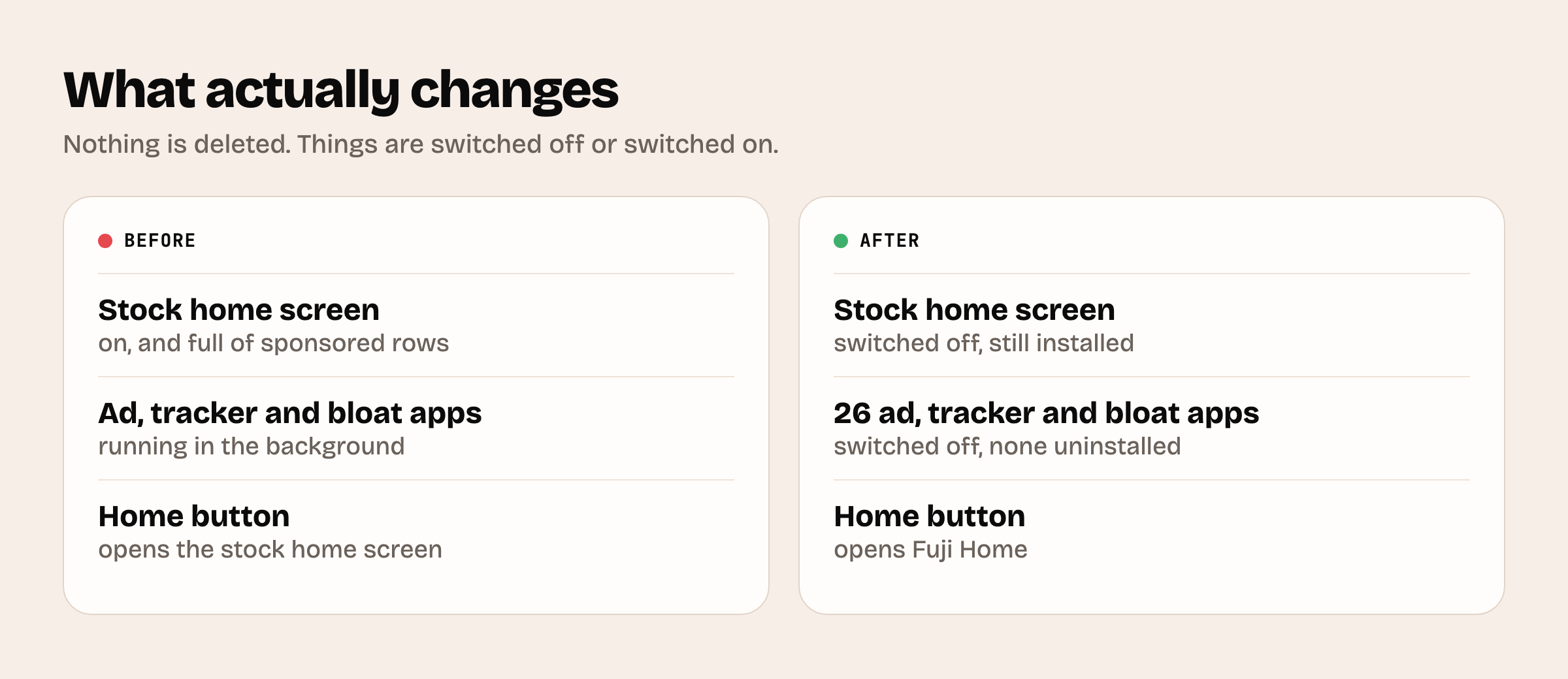
- The debloat part works the same way: ad, tracker and bloat apps get *switched off*, using Android's own "disable" feature. Not uninstalled. Switched off.
So there's nothing hacky going on, nothing is rooted, and nothing is flashed. It's apps being switched on and off.
## The risk (and why I took it)
There's one thing I won't skip over: there's no 100% guarantee this goes well.
When you switch off system-level apps, a TV can sometimes get stuck at the boot logo after a restart. People in the project's issue tracker have reported it on a few models. The tool has safety checks now and refuses to switch off the parts that caused those problems, but I can't promise your TV is safe, and I can't promise mine was. If the worst happens, you may be looking at a factory reset, or a trip to a service centre.
I thought about it properly. I found two or three people with TVs similar to mine who had done this and come out fine. The stars, the number of contributors and the experiences people shared all pointed the same way. And honestly, the bloat was so annoying that the risk felt worth it.
So I did it. I restarted the TV twice afterwards, and it came back up smoothly both times.
## What it actually switched off
The tool went through my TV and switched off **26 apps**: ad apps, trackers and bloat. A few examples are the stock home screen, an ad app that fed sponsored rows to the home screen, a shop demo app and some background services nobody needs.
None were uninstalled. My apps, their data and my logins (Netflix, Hotstar and the rest) were never touched.
Before changing anything, it also made a full backup of the TV: every app and whether it was on or off, all the settings, the home screen and the screensaver. And it wrote a **restore script** for that exact TV:
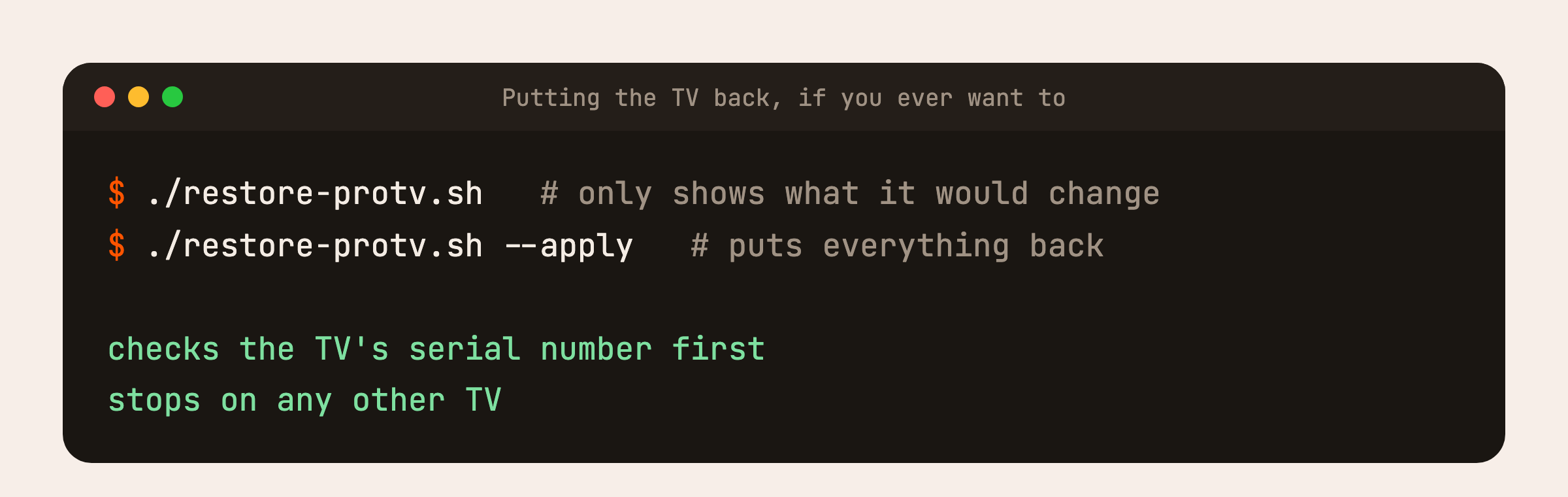
That one script switches everything back. It even checks the TV's serial number first, so it refuses to run on a different TV by mistake. That mattered to me, because there are two TVs in my house and I only wanted to touch one.
And if you'd rather not touch a laptop at all, you can undo it with just the remote: **Settings → Apps → See all apps → Show system apps**, find your old launcher (usually "Android TV Home") and choose **Enable**.
It also means that if you ever give the TV to someone else, or your family hates the new look, going back takes a couple of minutes.
At this point the TV was fast. The ads on the home screen were gone. But it was also pretty bare, and now I wanted it to feel like *mine*.
## Why Mount Fuji
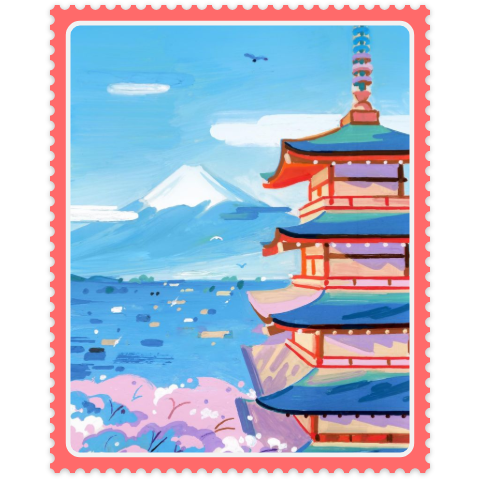 Two years ago I went to Japan, and I haven't stopped thinking about Mount Fuji since. Seeing it in person, with the snow on top and the whole sky around it, is honestly my favourite thing ever. I love Japan in general, but Fuji is the one.
Back home I live in Apple's world: a Mac, an iPhone, AirPods, and that lock screen where the clock tucks behind the picture. Then I'd walk into the living room and the TV looked like it was from a different century.
An Apple TV box costs real money, and I won't pretend a custom home screen is the same thing. But the *look*, that calm, spatial feel, I could build on the TV I already owned. And my parents use this TV every day too, so it had to stay simple enough for them.
That's Fuji Home: my favourite mountain, a big clock behind it, and the apps my family actually uses.
 ## The part I love most: the clock behind the mountain
On the iPhone, the clock sits *behind* the subject of the photo. The mountain stands in front of the time. That small trick is what makes a lock screen feel deep. I wanted exactly that on a TV, on an old, slow set.
The trick is that the TV doesn't do anything clever. It just stacks three pictures:
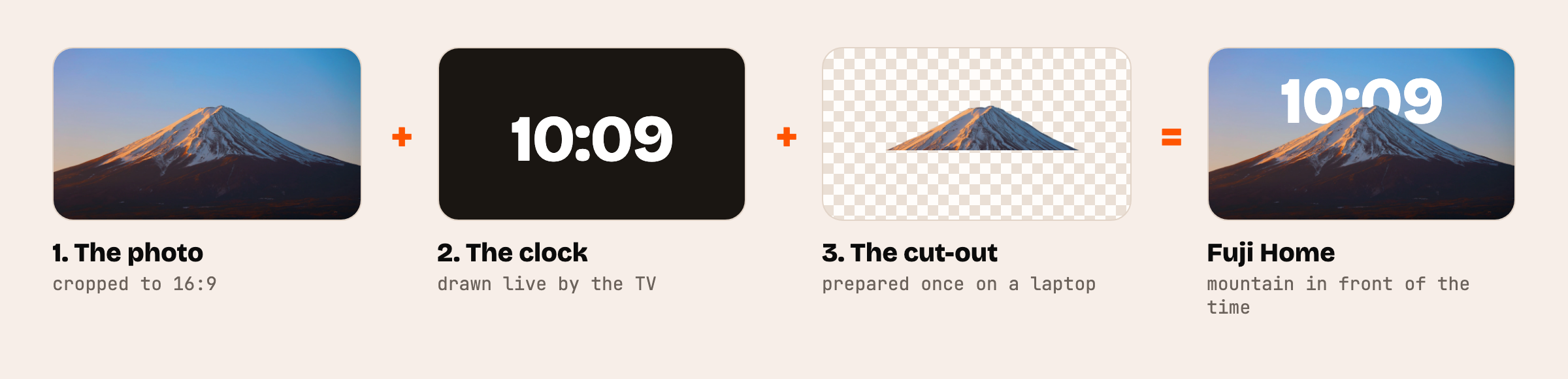
1. **The photo**, cropped to 16:9 at 1920 by 1080.
2. **The clock**, drawn live by the TV on top of it.
3. **The cut-out**, which is the mountain from the same photo with the sky removed, drawn *over* the clock.
The cut-out is the clever part, and it's done once, on my laptop, not on the TV. A script goes through the photo column by column. The sky is a smooth gradient, so in each column, the scenery starts at the first sharp change in colour. Trace that edge across the whole picture and you have the outline of the mountain. Everything below it is saved as a transparent image.
Because all of that work happens in advance, the TV only has to stack three pictures. That's why it stays fast, even on older sets with 2 GB of RAM.
It has limits. This approach works for mountains and skylines, where the edge is clean. It wouldn't work on trees or mist. Five of the wallpapers have the depth effect, and the rest are regular photos with the clock on top.
## Rebuilding the whole home screen
Then I went on to build the rest, and I changed the entire UI, including the icons and logos, which looked off and needed redoing.
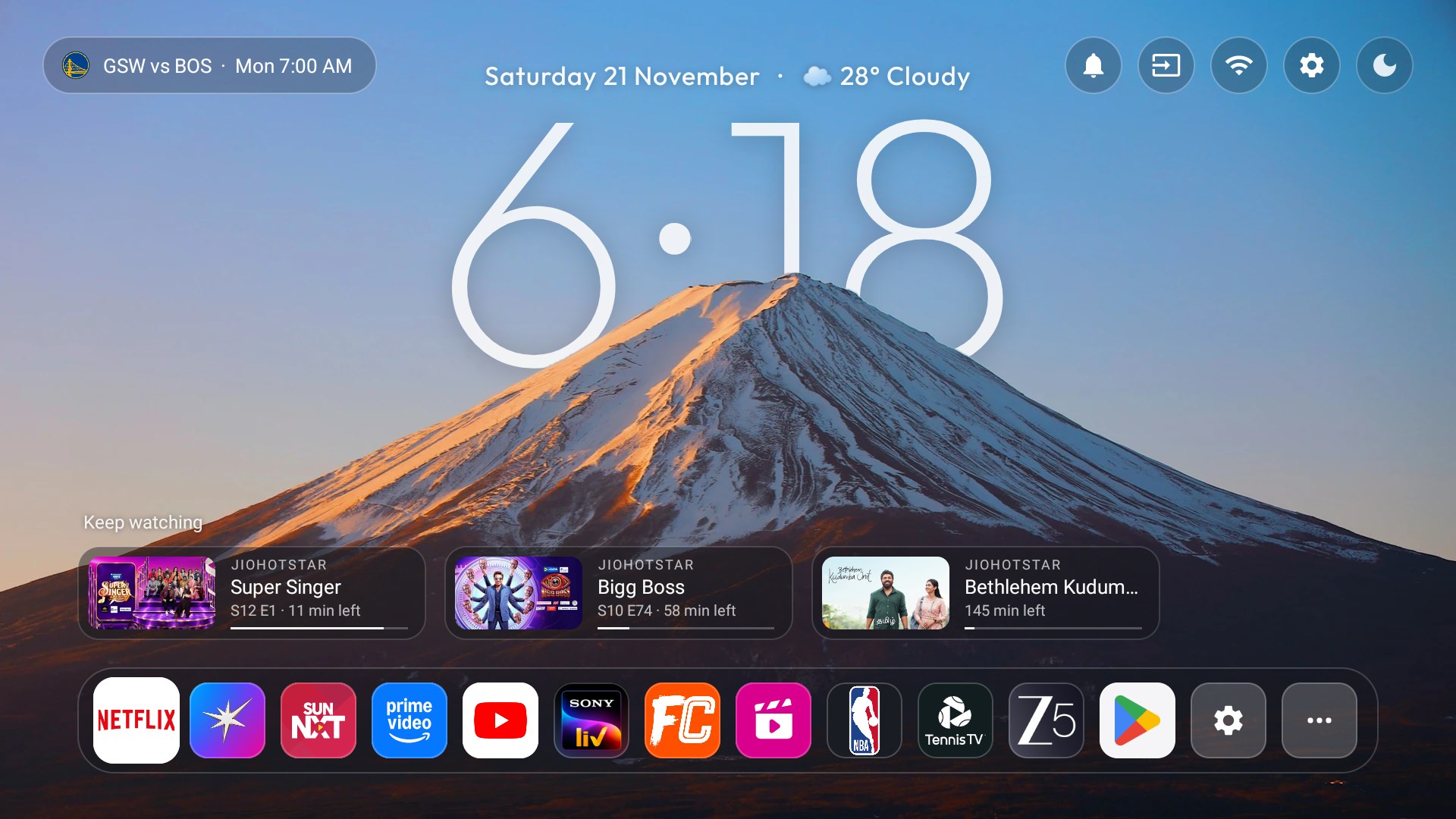
Here's what's on screen:
- **A big clock** behind the mountain, with the date and today's weather.
- **A dock** at the bottom with only the apps my family uses.
- **Keep watching**, built from the TV's own list of shows you left halfway.
- **Round buttons** in the corner for notifications, inputs (HDMI, AV, Live TV), Wi-Fi and settings.
- **A ••• menu** with the wallpaper picker, all your apps (the apps tab) and a night mode that dims the screen.
The weather comes from [Open-Meteo](https://open-meteo.com), a free weather service with no sign-up, and the app checks it every 30 minutes. That's about all it does in the background.
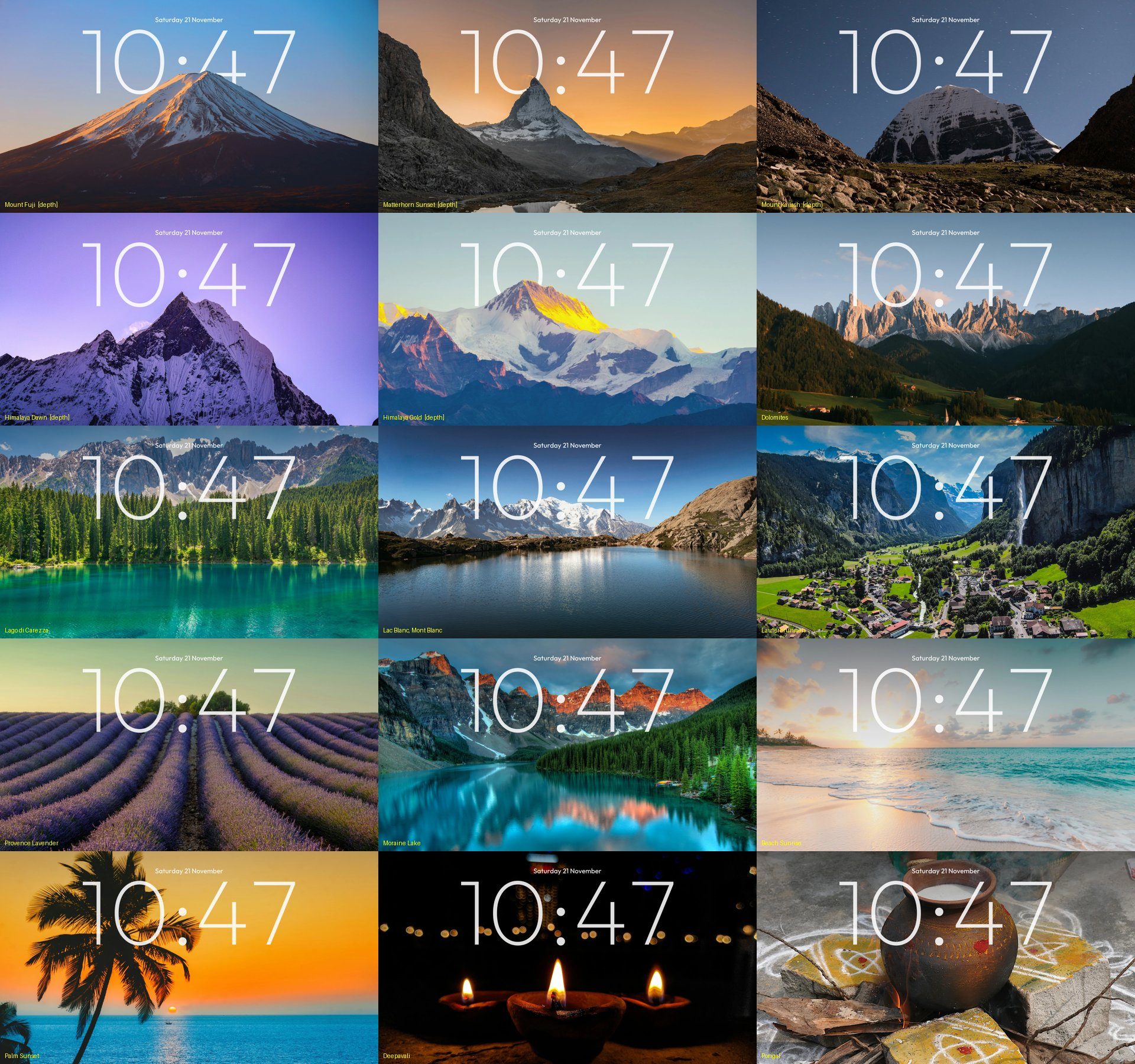
I also added **13 wallpapers** (the repo ships with a couple more), all HD nature photos from [Unsplash](https://unsplash.com). When the TV sits idle, the same clock becomes the screensaver and moves to a new wallpaper every 10 minutes.
## Features for my family, and for me
Once the basics were done, I started adding the things I'd actually use. They're built as add-ons, so they're off by default and you can switch them on in one config file.
**The Tamil calendar, for my parents.** They check the daily Tamil calendar every morning, so I wanted it right on the TV. Open ••• → Tamil Calendar and it shows that day's sheet from [tamildailycalendar.com](https://www.tamildailycalendar.com), exactly as published. The day's festival or vratham, like Ekadasi, Pradosham or Pournami, also shows up on the date line in Tamil. On big days like Pongal or Deepavali, a festival wallpaper shows up for that day. My family loved this one more than anything else.
**NBA scores, for me.** I'm a big NBA fan, so there's a small widget in the top corner with my team's next game, or the final score after one. During a live game, a scoreboard appears under the clock and refreshes every 30 seconds. The scores come from ESPN's public scoreboard. You set your team in `config.xml` (like `gs` or `lal`).
Both are in the repo as examples, so if you follow a different sport, or a different calendar, you can build your own.
### What I'd add next
There's plenty of room. Sending a message from your phone to the TV is high on my list: scan a QR code, type a note, and it pops up on the screen. Other people's TV launchers have this, and it would be useful in a house with family.
## Before and after
Here's the TV before and after, in one go:
You can [drag the slider yourself here](https://prodhosh.github.io/fuji-home/compare.html). The "before" is a photo of a stock Google TV home screen, credited to the CleanYourTV project. The "after" is my TV.
## Is it safe? What if I hate it?
Short version: you can always go back. Nothing is uninstalled and nothing is rooted. The one real risk is the boot issue I mentioned, and that's why I'd rather be upfront about it than pretend it's zero.
A few other questions I'd have asked myself:
Will my Netflix, YouTube and other logins stay?
Yes. Fuji Home never touches other apps, and the debloat never clears any app's data or cache.
Does it remove the ads inside Netflix, YouTube or Prime Video?
No. Those ads come from the apps themselves, and only their ad-free plans remove them. Fuji Home removes the ads and recommendations on the *home screen*, and the debloat switches off the TV's own ad apps.
Will it slow my TV down?
It usually does the opposite. The wallpapers are pre-sized for the TV, the depth effect is a stack of images rather than a live effect, and nothing runs in the background except a weather check every half hour. It was built and tested on a 2 GB Android TV 10 set.
Can it restyle the TV's Settings screens?
No. Those belong to the TV's system. Fuji Home opens them, but they look the same as before.
What happens when the TV updates its software?
Usually nothing. Once in a while, a firmware update turns the old launcher back on. If the old home screen reappears, switch it off again, or run CleanYourTV's `tools/check.py`.
Does it work on Fire TV, Samsung or LG?
No. Fire TV doesn't let other apps take over Home, and Samsung and LG don't run Android. For those, CleanYourTV has a guide to turning off tracking with just the remote: [cleanyour.tv/not-android](https://cleanyour.tv/not-android).
Does it collect any data?
No accounts, no analytics and no ads. It only goes online for weather, the posters in Keep watching, and the add-ons if you turn them on.
Is it safe to leave debugging on?
No. Network debugging lets anything on your Wi-Fi control the TV. You need it on while you set things up, then switch it off in Developer options and make sure it's really closed.
## Try it on your own TV
 You need an Android TV or Google TV on **Android 8.0 or newer** (Sony, TCL, Xiaomi, Hisense, Philips, Nvidia Shield, Chromecast with Google TV and most others), a computer on the same Wi-Fi, and Developer options switched on once.
The order matters, so follow it:
1. **Back up first** and make your restore script.
2. **Install Fuji Home** and check that it opens properly.
3. **Only then** make it your home screen.
4. **Never uninstall Fuji Home while the old launcher is switched off.** Turn the old one back on first.
Everything is open source:
- **[Fuji Home](https://github.com/PRODHOSH/fuji-home)** is the home screen. The README has the install steps, how to build it yourself, how to add wallpapers and add-ons, and the full FAQ.
- **[CleanYourTV](https://github.com/Gathin23/cleanyourtv)** is the debloat tool that made all of this possible, by Gathin23. Go and give it a star.
- **[Live before and after slider](https://prodhosh.github.io/fuji-home/compare.html)**
If you add a wallpaper, a fix, or an add-on for a sport I don't follow, pull requests are very welcome.
## Credits
Fuji Home is built on CleanYourTV by Gathin23. Weather is from [Open-Meteo](https://open-meteo.com), NBA scores are from ESPN's public data, and the Tamil calendar is from [tamildailycalendar.com](https://www.tamildailycalendar.com). The stickers are from [Stick It Up](https://stickitupx.com/stickers) by Samiran De (MIT), the font is [Outfit](https://fonts.google.com/specimen/Outfit), and the wallpapers are by photographers on [Unsplash](https://unsplash.com). Fuji Home isn't affiliated with Apple, Google, ESPN, the NBA or any TV maker.
 Made with love for Mount Fuji, and for one family's TV.