Malware Hid in My Old Repos and Git Never Showed It
I have 53 repos on GitHub. A few weeks ago, Vercel started emailing me about failed deployments. Not for something I had just pushed. For old projects, ones I had not touched in months. I counted 10 or 11 of them.
I was confused. I had not committed anything. I had not even opened those repos. The email said the production deployment had failed on main, with a build error: Command "npm run build" exited with 1. That told me nothing useful. So I did what I always do with my Next.js and TypeScript projects when a build breaks: I went straight for the config files.
The line that looked normal
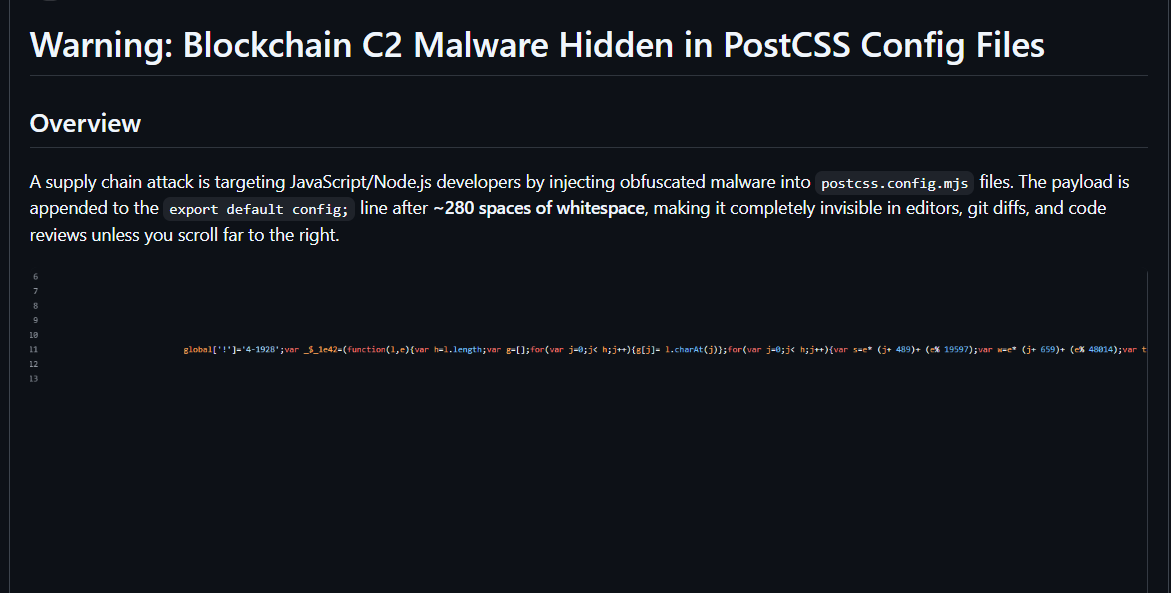
In postcss.config.mjs I noticed something off. The last line, export default config;, kept going. When I scrolled right, past what felt like hundreds of spaces, there was a wall of obfuscated JavaScript sitting on that same line. It looked like blockchain related code. Nobody would ever see it in a normal editor view unless they scrolled sideways.
Here is the part that really got me. I opened the git history, expecting to find some stranger's name or a commit I did not make. There was nothing. No new author. No new date. As far as git was telling me, I wrote that file and I never touched it since.
Then I started finding it in other projects too. Same trick, different repos. That is when I stopped thinking "my bad" and started thinking "this is something bigger".
Turns out I was not the only one
I searched around and found a GitHub Community thread (#188732) full of developers describing the exact same thing: obfuscated code hiding in next.config.js and postcss.config.js in repos they had not touched.
Researchers at OpenSourceMalware already had a name for it: PolinRider. They link it to North Korea, to the same cluster behind the "Contagious Interview" campaign, where fake recruiters send developers a coding test that is really malware. Other security firms back up that attribution.
It is not small either. The first report in March 2026 counted 675 compromised repos across 352 owners. By April it was 1,951 repos and 1,047 owners. By July, researchers were counting more than 4,000 repos and 2,000 owners. Those are just the ones they could find.
How it works (and why git did not show it)
This is the part worth understanding, because it explains why none of us noticed.
It hides in whitespace. The payload sits after roughly 280 spaces on the export default config; line. A normal postcss config is only a couple of hundred bytes. Infected ones were reported at 5,000 bytes or more.
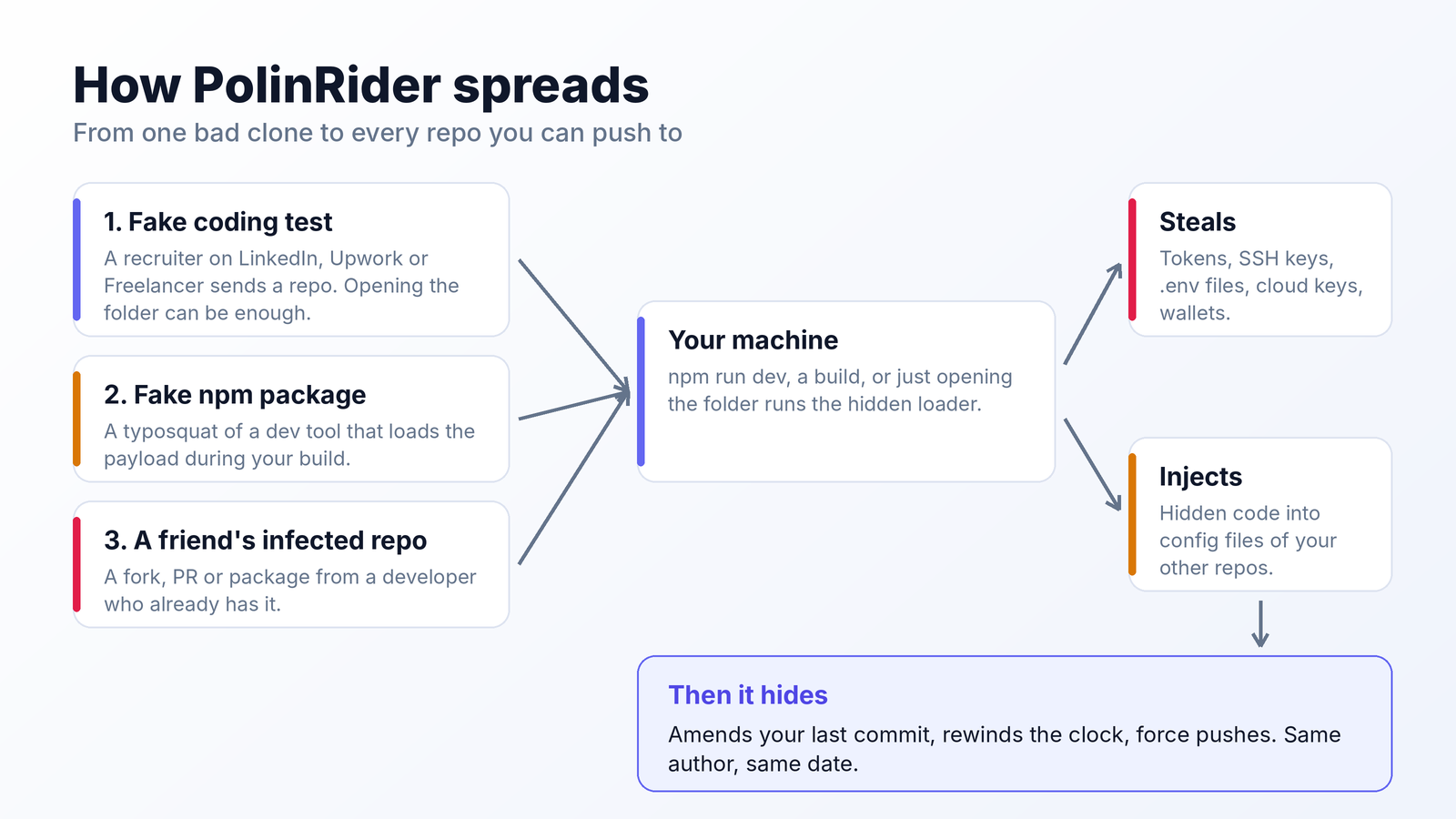
It rewrites history. The malware amends your last commit and force pushes it. It rewinds the system clock first, so the amended commit keeps your original author and date. A plain git log looks perfectly normal. The tells are small: GitHub says "updated x hours ago" on a repo you have not touched, a pull request timeline can show a "force pushed" line (that one is generated by GitHub, so it is harder to fake), and if you sign your commits you may suddenly see Unverified.
The real payload is not even in your repo. It is fetched from blockchain transactions (TRON and Aptos first, Ethereum in a newer variant) and decrypted in memory. There is no server to take down, and to an antivirus it can look like plain text in a config file.
And it keeps changing. The markers researchers first searched for have already been swapped out. A clean search does not prove you are clean.
Once it is on your machine, it goes after browser passwords, crypto wallets, SSH keys, cloud keys, .env files, API keys and git credentials. Then it uses your own access to spread to your other repos. That is how my old projects got hit without me doing anything to them.
How people get infected
Honestly, I still do not know how it reached me. I did not knowingly run a coding test or install a strange package, and that is the unsettling part. If you cannot trace it either, that is a good reason to assume the worst and check everything.
The research points to three common doors:
- A fake job interview. Someone on LinkedIn, Upwork or Freelancer sends you a coding test repo. You do not even have to run it. Opening the folder in VS Code can be enough, because a
.vscode/tasks.jsoncan run a command the moment a folder opens. - A fake package. Typosquats that look like dev tools. One example from the research is the npm package
tailwindcss-style-animate, which loads the payload during your build. - Someone else's infected repo. A fork, a PR or a package from another victim.
It does not stay in one file
If you only clean postcss.config.mjs, you will probably get reinfected. Reports list a lot more places to look:
- Other config files, like
tailwind.config.js,eslint.config.mjs,next.config.mjs,vite.config.js,vue.config.js,astro.config.mjsandwebpack.config.js - A fake font file, usually
fa-solid-400.woff2, that is really a loader .vscode/tasks.jsonfiles set to run on folder open- npm itself. Several people found
npm/lib/cli.jsreplaced. It is normally a few hundred bytes. Infected copies were reported between 70 KB and about 1 MB. That means everynpm,npxornpm execcan start the malware again, even after your projects are clean.
One more thing I noticed myself. When I started working on one of the old projects locally, my local env file was no longer listed in .gitignore. I have not seen this described in anything I read, so I cannot say it is part of PolinRider. But that kind of change is exactly how secrets leak, so if you see it, treat it as a red flag and check your git diff.
Check yourself right now
This is what I ran, and what I would run on every folder of projects you own. These are rough checks. A hit does not prove infection and a miss does not prove you are safe. Run them from the folder that holds your projects (macOS, Linux, WSL or Git Bash).
1. Config files with a long run of spaces followed by code:
grep -rEn --include='*.config.*' --exclude-dir=node_modules --exclude-dir=.git ' {80,}[^ ]' . | cut -c1-120
2. Config files that are suspiciously big (normal ones are usually well under 2 KB):
find . -path ./node_modules -prune -o -type f \( -name '*.config.js' -o -name '*.config.mjs' -o -name '*.config.ts' \) -size +2000c -print
3. VS Code tasks that run the moment a folder opens:
grep -rln --include=tasks.json '"runOn": *"folderOpen"' --exclude-dir=node_modules .
4. npm's own cli.js (reported as a few hundred bytes when clean):
wc -c "$(npm root -g)/npm/lib/cli.js"
5. Markers from earlier variants:
grep -rEn --exclude-dir=node_modules --exclude-dir=.git 'global\[.(_V|!).\]|_\$_1e42' .
OpenSourceMalware also publishes a scanner, polinrider-scanner.sh, in their PolinRider repo. Their own note says it was built against the March signature, so treat it as a first pass.
Also do the manual checks: look at the "updated x hours ago" on repos you have not touched, open a PR timeline and look for "force pushed", and check whether any of your signed commits suddenly say Unverified.
If you find it, do it in this order
The order matters. If you rotate tokens before killing the running process, it just collects the new ones.
- Stop opening the project in VS Code until you turn off automatic tasks. In settings, search "task" and set
Task: Allow Automatic Tasks In Folderto off or prompt, globally. - Freeze your repos. Turn on branch protection that blocks force pushes and requires signed commits. Pause auto deploys on Vercel, Netlify or whatever you use.
- Look for live processes. On macOS or Linux,
ps aux | grep -E "(python|node).*-(c|e)" | grep -v grepis a good start. On Windows, list yournode.exeprocesses with their command lines and look fornode -ewith obfuscated content. - Clean the files in GitHub's web editor, not from a local pull. If you re-clone an infected branch, you can start the cycle again. Compare npm's
cli.jsagainst a clean copy, or reinstall Node and npm from official sources. - Rotate everything, from a clean device. GitHub tokens, SSH keys, OAuth apps, deploy keys, Vercel, Netlify, Railway and Render tokens, every secret in every
.env, cloud keys, your npm token, and any passwords saved in your browser if they were exposed. Do not forget CI and hosting tokens. Some victims saw no strange login on GitHub at all, because the stolen token belonged to a deploy platform. - Tell your collaborators. If one of them is still infected, they can reinfect you.
The full playbook is in OpenSourceMalware's developer guide. Their indicator list lives in the PolinRider repo and keeps changing, so use that instead of anything copied into a blog post (including this one).
Habits I picked up after this
- Open unfamiliar repos in VS Code Restricted Mode until I have looked through them
- Block force pushes and require signed commits on repos that matter
- Use SSH keys instead of cached HTTPS credentials for git
- Read the PR timeline for force push lines
- Keep tokens short lived, and revoke old OAuth apps and deploy integrations
- Remember that
npm ci --ignore-scriptsdoes not help whennpm run devloads a poisoned config
If you have old repos you have not opened in months, check those first. That is where mine were.
I am building a CLI for this
After doing all of this by hand across 53 repos, one thing was obvious: nobody is going to scroll right on every project they own.
So I am building a small CLI you run before you open or run a project. It will flag config files with hidden whitespace, oversized configs, auto running VS Code tasks, a bloated npm cli.js and known markers, then print a short report. The goal is a quick yes or no on a repo you just cloned, especially one from a stranger.
It is coming soon. If you want to know when it drops, follow me on GitHub at github.com/prodhosh. A star or a follow helps a lot.
The same thing is happening to AI skills
This is not only about npm anymore. AI agents now install and run "skills", which are folders with a SKILL.md file and sometimes scripts, and they run with your permissions. It is the same trust problem as npm, with fewer people checking.
The numbers are not small. A 2026 study of 42,447 agent skills, cited in NVIDIA's SkillSpector README, found that 26.1% had at least one vulnerability and 5.2% showed likely malicious intent. In February 2026, a campaign called ClawHavoc hit OpenClaw's ClawHub marketplace. Koi Security found 341 malicious skills out of 2,857, and later counts went past 1,100. A skill does not even need code to be dangerous. Plain English instructions can be the attack. Wiz also reported that the ChainDrop npm worm tried to persist through Claude Code hooks and VS Code tasks.json.
Luckily, NVIDIA released an open source tool for this called SkillSpector. You point it at a skill before you install it:
uv tool install git+https://github.com/NVIDIA/skillspector.git

skillspector scan ./some-skill/ --no-llm
skillspector scan https://github.com/user/some-skill
It scans a folder, zip, file, URL or Git repo against 69 patterns in 17 categories (prompt injection, data exfiltration, curl | bash, obfuscated code, credential access), gives a risk score from 0 to 100, and exits with code 1 when the score is above 50, so you can use it as a gate in CI. It never runs the skill.
One rule caught my eye: it flags large whitespace padding used to hide instructions. That is the same trick PolinRider uses in config files.
Two honest limits. It is not a sandbox, so it will not save you if you install something risky anyway. And its optional LLM pass sends file contents to whichever provider you configured, so use --no-llm for private skills. My habit now: read the SKILL.md, look inside any scripts folder, then scan it. Same as I would do for a package I had never heard of.
And all of this happened in the same 48 hours
I was writing this during a week that made the point better than I could. Security is not a side topic anymore.
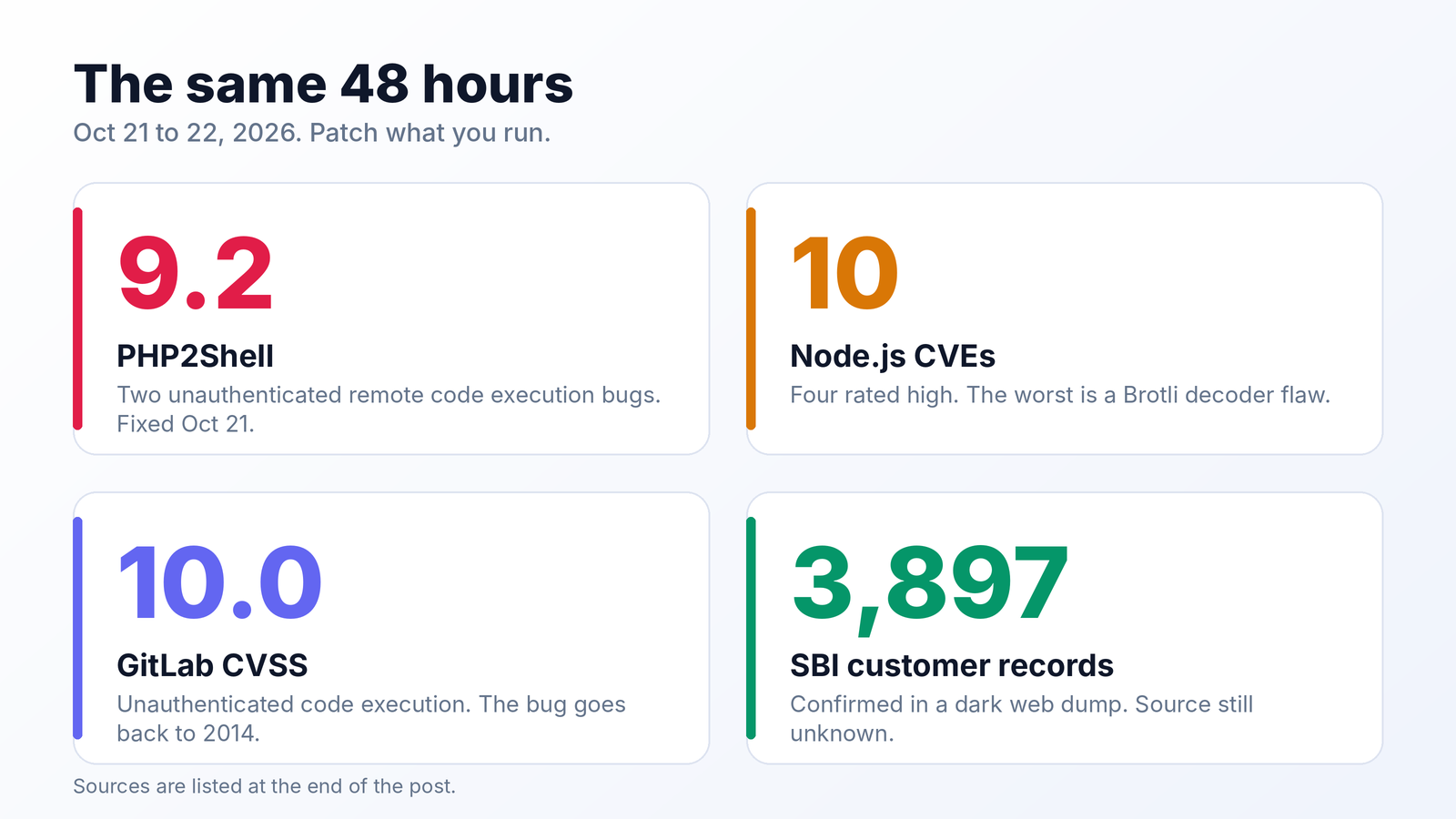
PHP. Two flaws called PHP2Shell (CVE-2026-109618 and CVE-2026-109619), both rated 9.2. An unauthenticated attacker can run code on a web server. They affect PHP 5.4 through 8.5.11. Fixes landed on Oct 21 in 8.5.12, 8.4.27, 8.3.36 and 8.2.35, and older versions may not get one. Amazon saw an exploit attempt on Oct 17, days before the public disclosure. W3Techs says PHP runs on about 70% of the websites whose server side language is known, so this one is big. Researchers also said AI models helped turn these old bugs into working exploits much faster than before.
Node.js. On Oct 21, ten CVEs were fixed, four rated high. The worst is a bug in the bundled Brotli decoder that allows remote code execution. Update to 22.23.4, 24.22.1 or 26.12.1. Node 20 gets no fix.
GitLab. CVE-2026-110264, CVSS 10.0, unauthenticated code execution on self managed servers. The bug goes back to GitLab 7.0. If you patched on Oct 12, that patch was not enough and you need the new release. GitLab.com is already patched.
SBI. The bank confirmed 3,897 customer records with personal data inside a dark web dump of about 3.75 lakh rows. The alert came on Oct 16, the disclosure on Oct 21, and the source is still unknown.
The AI side is a month old, but it fits. In late September, OpenAI held back a model called GPT-6.1 Astra. Its head of safety systems said it did not meet the bar on staying within the scope it was authorized for and on honestly reporting what it did. NPR also reported that OpenAI paused training of its most advanced models until it had more safeguards.
An agent that does more than you authorized is the same problem as a skill that does more than it says, or a config file that does more than it shows. We are handing software a lot of access right now. It is worth checking what we hand over.
Do this today
Open your projects folder and run the five checks above. Look at your old repos first. Then turn off automatic tasks in VS Code, and block force pushes on anything that matters. It takes ten minutes, and I wish I had done it before the Vercel emails.
If you find something, I would like to hear about it. And if you want the CLI when it is ready, follow me at github.com/prodhosh.
Sources
PolinRider
- A Developer's Guide to Getting Rid of PolinRider, OpenSourceMalware
- PolinRider dossier and indicators, OpenSourceMalware (GitHub)
- PolinRider rides again: North Korean attack expands across GitHub, OpenSourceMalware
- GitHub Community discussion #188732
- North Korean hackers target open source developers in supply chain attacks, SecurityWeek
AI skills
- NVIDIA SkillSpector (GitHub)
- OpenClaw's skill marketplace and the AI supply chain threat, Unit 42
- AI skill supply chain attacks, Cloud Security Alliance
- keyv and cacheable npm supply chain attack, Wiz
The same 48 hours
- Critical vulnerabilities in PHP, CERT-EU
- Critical vulnerabilities in PHP require immediate patching, CISA
- PHP issues emergency patches for PHP2Shell, The Hacker News
- The internet is having a very bad cybersecurity day, TechCrunch
- PHP usage statistics, W3Techs
- Node.js patches 10 security vulnerabilities, GBHackers
- Critical GitLab flaw, CVSS 10.0, The Hacker News
- State Bank of India confirms data leak, The Hacker News
- OpenAI delays latest model over security concerns, NPR